
In this month’s .net magazine (known as Practical Web Design in the US) there was an interesting article where an ethical hacker showed how he would break into your site — and what you can do to stop him. In this post we’ll look past “X Plugins To Save Your Blog” and see what effective steps you can take to stop a real life hacker.
Hiding WordPress
One of the first things our “ethical hacker” did was to find out what software the site was running on. That means in order to stop him you’ll have to hide any indication that you’re using WordPress. Which is slightly harder than it appears at first.
If I look at a site to me it’s pretty obvious if it’s running WordPress. Let’s take a look at DesignInformer’s head tag:
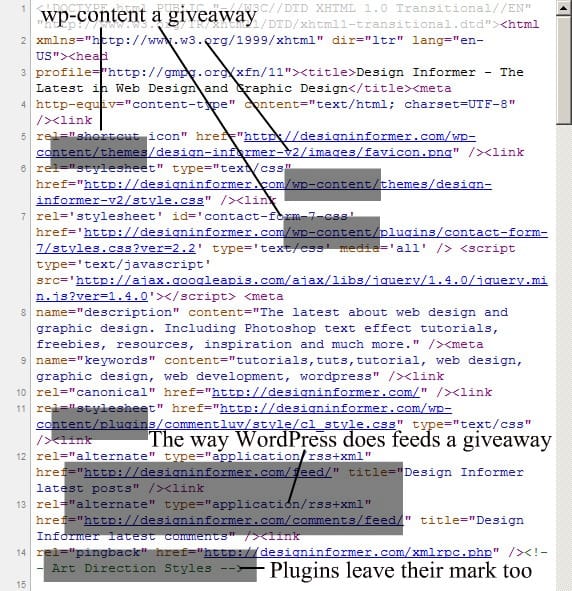
We’ll come to wp-content in a sec, but first to RSS feeds. I don’t know how other CMSes do feeds, but to me when I see /feed/ and /comments/feed/ immediately I think WordPress. You can get around this by using something like Feedburner for your RSS feeds.
If you’re using plugins which are leaving their mark, quite literally, then the best thing to do is to manually edit the plugin to get rid of the comment. All you need to do is click ‘Plugins’, ‘Editor’, select the offending plugin and then search for the comment. Delete it and save. It’s gone! It will get overwritten if you update though, so just make sure you repeat the process with each upgrade.
Remove ‘Stuff’ WordPress Spits Out Into wp_head
As Jeff explains, WordPres spits out a load of quite useless stuff into wp_head, all of which you can easily remove with this code in your functions.php:
// remove junk from head
remove_action('wp_head', 'rsd_link');
remove_action('wp_head', 'wp_generator');
remove_action('wp_head', 'feed_links', 2);
remove_action('wp_head', 'index_rel_link');
remove_action('wp_head', 'wlwmanifest_link');
remove_action('wp_head', 'feed_links_extra', 3);
remove_action('wp_head', 'start_post_rel_link', 10, 0);
remove_action('wp_head', 'parent_post_rel_link', 10, 0);
remove_action('wp_head', 'adjacent_posts_rel_link', 10, 0);
With all that removed, there’s no immediate indication you’re running WordPress.
Hiding wp-content
This one’s a bit more difficult, but it’s still doable, as the codex explains:
Set WP_CONTENT_DIR to the full local path of this directory (no trailing slash), e.g.
define( 'WP_CONTENT_DIR', $_SERVER['DOCUMENT_ROOT'] . '/blog/wp-content' );Set WP_CONTENT_URL to the full URI of this directory (no trailing slash), e.g.
define( 'WP_CONTENT_URL', 'http://example/blog/wp-content');
Hiding wp-admin
Even if you’ve moved everything from the head, going to /wp-admin/ will tell me immediately whether you’re running WordPress or not. It’s actually surprisingly easy to move the entire wp-admin folder, Michi explains – you just need some .htaccess code to redirect the whole lot to another folder. You could be sneaky and redirect it to /administrator to fool any hacker 😉
Powered by…
Pretty obvious, but worth a mention – don’t forget to remove ‘Powered by WordPress’ from your theme!
Stopping the hacker gaining access
In the article the hacker just goes through the different software used on the site, listing out of date software with vulnerabilities. That means it’s imperative to keep your site updated. That doesn’t necessarily mean the latest version though. Sites like Mashable stay a version number behind at the latest stable version in order to protect themselves from new vulnerabilities – quite a clever way of staying secure.
The article specifically mentions blocking access to the backend by IP is a good idea — the following code will do the trick:
order deny,allow
allow from a.b.c.d # This is your static IP
deny from all
Rounding up
And that’s it. Hopefully this post has been helpful to you and shown you how a real world hacker would hack your very real world site – yours. Don’t be too scared; be prepared instead!


what the hell. you didnt tell that where to put thiese codes?
This no longer works in new versions wordpress.
Yields the following
Fatal Error: Call to undefined function remove_action()
Thoughts?
[…] You may also want to consider hiding your site as a WordPress site. While obfuscation is not necessarily a means of securing your site — especially if that’s the only thing you’re doing — it might not hurt. A hacker who knows how to get into WordPress could be diverted if, for example, your wp-login.php page was moved to a different address. Alex Denning of WPShout has some great suggestions of ways to confound potential hackers. […]
[…] You may also want to consider hiding your site as a WordPress site. While obfuscation is not necessarily a means of securing your site — especially if that’s the only thing you’re doing — it might not hurt. A hacker who knows how to get into WordPress could be diverted if, for example, your wp-login.php page was moved to a different address. Alex Denning of WPShout has some great suggestions of ways to confound potential hackers. […]
True, but I did mention that 😉
The hacker I mentioned throughout the post is a real life hacker and he was showing how he’d get into a real life site, so it would seem obscurity is a pretty good form of security, no?
Hi!
Thanks for your valuable infos…
But you forget to specify to remove the file “readme.html” from the root of WordPress.
Good point! Hadn’t thought of that one.
Also might be worth noting, even if one had invested the time and masked all the above directories etc. – it appears fairly obvious that by peeking into a site’s CSS and finding something like:
/*
Template name: template
*/
could also be a giveaway.
Yes I agree. Image locations can give it away too.
Yep. That’s why we moved the wp-content directory 🙂
Yeah, that’s a tough one to hide although just because you’ve got a template name, doesn’t necessarily mean it’s WordPress does it?
All good points – however, how does a WP upgrade via the Admin fair after you’ve rerouted all the folders? Which directories , if any, does WP, or possibly a plugin or even a theme, assume to be in a specific location even after you’ve made functions mods etc.
I don’t know, to be honest! I think you’d probably be wise to upgrade manually as that’d allow you to get around the problem.
Plugins and themes should still work fine.