
I had the visual pleasure of reading Ben Gillbanks’ blog, BinaryMoon the other day. Whilst Ben’s blog is usually looking pretty darn good, using WordPress as an advanced blogging platform, the other day it looked particularly good. Why? Ben was using unique page templates for specific blog posts.
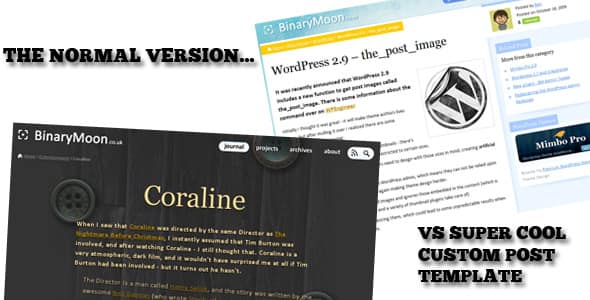
I immediately thought to myself: “I need to know how to do that.” So I found out. Looks like Elemental is using some rather like Nathan Rice’s post template plugin which adds a simple dropdown to the post editor offering different post templates.

As themes and plugins start to merge more and more these days, this is yet another example of the merging that’s taking place – to integrate post templates into a theme is really easy:- download and unzip the plugin, open the php file and copy and paste into your functions.php file (at the very bottom, after closing php tag; you’ll want to tidy it up later one you’ve decided you’ll keep it). Next, you need to create the page template – create a duplicate of your single.php file but add the following to the very top of the file:
<?php
/*
Single Post Template: Template Name
Description: This part is optional, but helpful for describing the Post Template
*/
?>
Upload it and check out the post editor. With that, you’re done! You can then get styling to your heart’s content and create a really unique experience for each post you make to your blog.


[…] Single Post Templates Made Easy for WordPress | WPShout.com – On the parlé la semaine dernière des pages d’articles qui étaient uniques sur certains blogs. Et bien voici une technique flow le faire facilement sur votre blog WordPress… […]
[…] that relates to the style of the post making his site quite unique. Alex Denning recently brought a post template plugin that does the same thing but obviously you will need to create the templates to use with it – these […]
[…] that relates to the style of the post making his site quite unique. Alex Denning recently brought a post template plugin that does the same thing but obviously you will need to create the templates to use with it – these […]